My Bookmarks2.9.8.24
Publisher Description
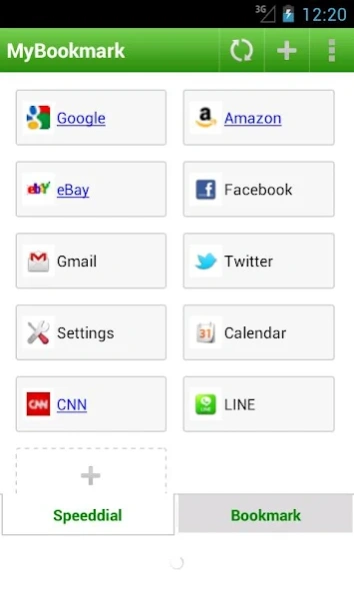


Apps, Games, WebSites, Organize it.
Bookmarks, Games, Applications,
Use MyBookmark to organize them all!!
MyBookmarks is the simple app to store and organize your favorite website and android apps.
The concept is "Webs, Apps, Shortcuts, bookmark them all!!"
That’s right. With MyBoookmarks, you can use website and apps seemlesly!!
[What you can do with this App]
1. Organize your favorite website or App, and launch them quickly.
These are called 'bookmark', and can be sorted as you like.
2. Categorize your bookmarks with folder.
Bookmarks are categorized by Category(Folder), which can be nested to 3-Tiers. Check your Android HOME, if you are lost in the tons of Apps, MyBookmark is the best to categorize them all!!
3. Powerful security function to protect your bookmark.
Bookmarks can be protected by security function. Set your important Bookmark as security enabled, and they are not shown until you login
to security mode by password.
[NOTE]
Please REMEMBER YOUR PASSWORD, you can not retrieve old password, as it is stored with strong encryption.
[App Permissions]
MyBookmarks needs these permissions.
- Bookmarks and History
To import brouser's bookmarks and history.
- Your accounts
To access Google Drive for online backup.
- Network communication
To launch bookmarks, show Ads, retreive icons.
[Release History]
30-Mar-2016 2.9.8.04
- Bugfix of 2.9.8.03.
Fixed backup/restore on android4, 5
29-Mar-2016 2.9.8.03
- Runtime permisson support (Android 6)
29-Feb-2016 2.9.8.02
- Enhancement
Security login is enabled by long pressing the title bar.
- Some bug fix.
2016-2-29 2.9.8.02
Bugfix of 2.9.8.01
Fixed application-abort occured on Android4, when saving bookmark via share from browser, and try to change category.
21-Feb-2016 2.9.8.01
Bugfix of 2.9.8.01
Fixed application-abort occured on Android4, when saving bookmark via share from browser, and try to change category.
19-Feb-2016 2.9.8.00
Bugfix
Fixed icon fetch failure when bookmarking website.
2-Sep-2015 2.9.7.00
- Support material design.
Update UI design, support google's material design.
18-Feb-2015 2.9.8.00
- Bugfix.
Fixed bookmarking website, as it failed by fetching icon for website.
Removed import function on Android6, as android6 removed interface for accessing browsers bookmarks.
2015-2-13 2.9.6.02
- Bug fix - since 2.9.6.01, for users using MyBookmarks with android L(<5.0) and Pro-addon installed, app launch failed due to license check. This problem fixed with this release.
2015-2-10 2.9.6.01
- Bug fix for favicon get when bookmarking website.
2014-9-20 2.9.6.00
- Edit bookmark name supported.
2014-2-16 2.9.4.09
- Performance optimization
Decreased memory footprint to support more bookmarks.
- UI enhancement
Support list style view.
2014-1-24 2.9.3.1
Bug fix for Online backup/restore.
2014-1-19 2.9.3
UI customize enhancement.
- Text size can be set on bookmark buttons.
- Icon size can be set on bookmark buttons.
- Auto adjust size of bookmark buttons (case bookmark text is long) can be switched on/off.
About My Bookmarks
The company that develops My Bookmarks is ululu. The latest version released by its developer is 2.9.8.24. This app was rated by 1 users of our site and has an average rating of 5.0.
To install My Bookmarks on your Android device, just click the green Continue To App button above to start the installation process. The app is listed on our website since 2022-08-01 and was downloaded 19 times. We have already checked if the download link is safe, however for your own protection we recommend that you scan the downloaded app with your antivirus. Your antivirus may detect the My Bookmarks as malware as malware if the download link to com.ululu.android.apps.my_bookmark is broken.
How to install My Bookmarks on your Android device:
- Click on the Continue To App button on our website. This will redirect you to Google Play.
- Once the My Bookmarks is shown in the Google Play listing of your Android device, you can start its download and installation. Tap on the Install button located below the search bar and to the right of the app icon.
- A pop-up window with the permissions required by My Bookmarks will be shown. Click on Accept to continue the process.
- My Bookmarks will be downloaded onto your device, displaying a progress. Once the download completes, the installation will start and you'll get a notification after the installation is finished.
Program Details
System requirements
Download information
Pricing
Version History
version 2.9.8.24
posted on 2022-08-01
Bug fix for Android 12+.
Fixed an issue where applications on the device could not be listed when adding an application as a bookmark.
version 2.9.8.20
posted on 2021-02-05
Added backup function to local (internal storage or SD card) and remote (Google Drive).
Regarding the integration into Android standard backup performed in 2.9.8.17, we received many requests to use the previous backup function as well.
For this reason, in addition to integration with Android standard backup, we have added local or remote backup function.
You can now back up multiple versions at any time.
version
posted on 2017-03-01
25-1-2017 2.9.8.12
- Bug Fix
Fixed an issue at custom browser selection at bookmark at Android6+, launching bookmark failed when default browser app was selected.
Fixed an issue that unnecessary duplicate shortcuts were created at the installation.
version
posted on 2016-09-13
2-9-2016 2.9.8.09,- Support search window. You can find bookmarks easily by typing fraction of bookmark name.,- Bug fix (duplicate shortcut are created on first install)
version 2.7.1
posted on 2013-06-18
Several fixes and updates
